
How to Connect Discord to OpenClaw
Add your OpenClaw agent to Discord servers to enable bot commands and conversational interactions.
Discord lets your OpenClaw agent reply to messages in your server. This guide follows the exact setup flow in Molten.Bot.
Before You Start
- A running OpenClaw workspace in Molten.Bot
- A Discord account with access to your server settings
- About 5-10 minutes to complete setup
Step 1: Open Settings
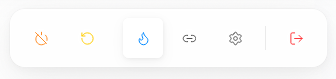
In your workspace, use the bottom dock and click the Settings icon.
Step 2: Open Channel Management
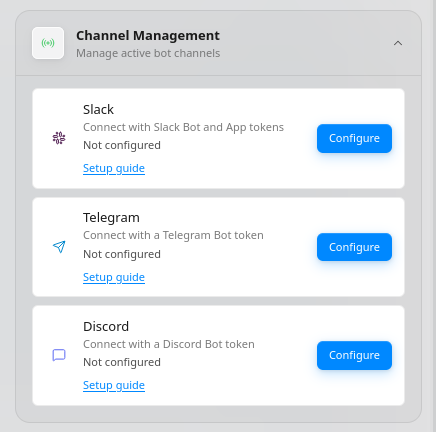
In Settings, open Channel Management, then find Discord and click Configure.
Step 3: Configure Discord
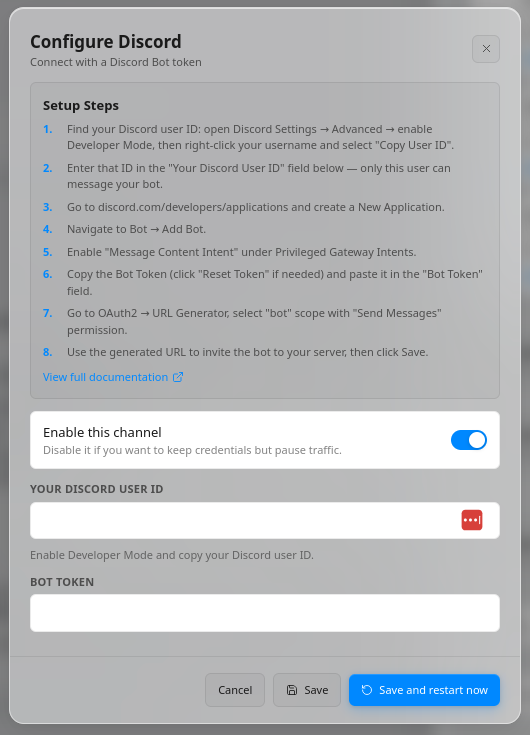
In the Discord configuration dialog, complete the setup steps shown in the UI:
- Find your Discord user ID: in Discord Settings → Advanced, enable Developer Mode, then right-click your username and select Copy User ID.
- Paste that value into Your Discord User ID.
- Go to the Discord Developer Portal and create a new application.
- Open Bot and click Add Bot.
- Enable Message Content Intent under Privileged Gateway Intents.
- Copy the bot token (use Reset Token if needed) and paste it into Bot Token.
- In OAuth2 → URL Generator, select the
botscope and Send Messages permission. - Use the generated URL to invite the bot to your server.
- Keep Enable this channel turned on, then click Save and restart now.
Test Your Bot
- Open your Discord server.
- Send a message that mentions the bot.
- Try a prompt like Summarize what happened in this channel today.
- Confirm your OpenClaw agent responds.
Troubleshooting
- No response: Re-check your Discord User ID and Bot Token in Molten.Bot.
- Bot is online but silent: Ensure Message Content Intent is enabled.
- Cannot invite bot: Re-generate the OAuth2 URL with
botscope and Send Messages permission.
Need help? Check the OpenClaw documentation or join the community Discord.