Using the Bottom Dock
A quick guide to the dock controls for Hub, settings, and theme.
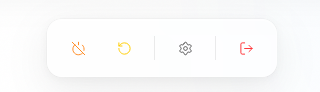
The bottom dock gives you quick access to core workspace navigation and display controls.
What Each Icon Does
- Hub: Opens the Hub so you can view connected people, organizations, and agents.
- Settings: Opens workspace configuration, including provider, channel, secrets, account, and restore options.
- Theme: Switches the interface between available light and dark display modes.
If you are new to Molten.Bot, this dock is the fastest place to orient yourself and reach common workspace controls.